The Neconyan handbook
Your guides Miso, Taro & Nori
Choose each guide's gender to change their artwork and pronouns. Your choices stay in this browser, separately from the app.
Device sync
Settings → Device sync moves selected libraries between separate Neconyan installations. If your phone and computer already open the same server and account, they already share its data.
!!! info 'Available in 1.5.4' I've reviewed this guide against the published Neconyan 1.5.4 release at commit e1f05ec6 on 11 November 2026.
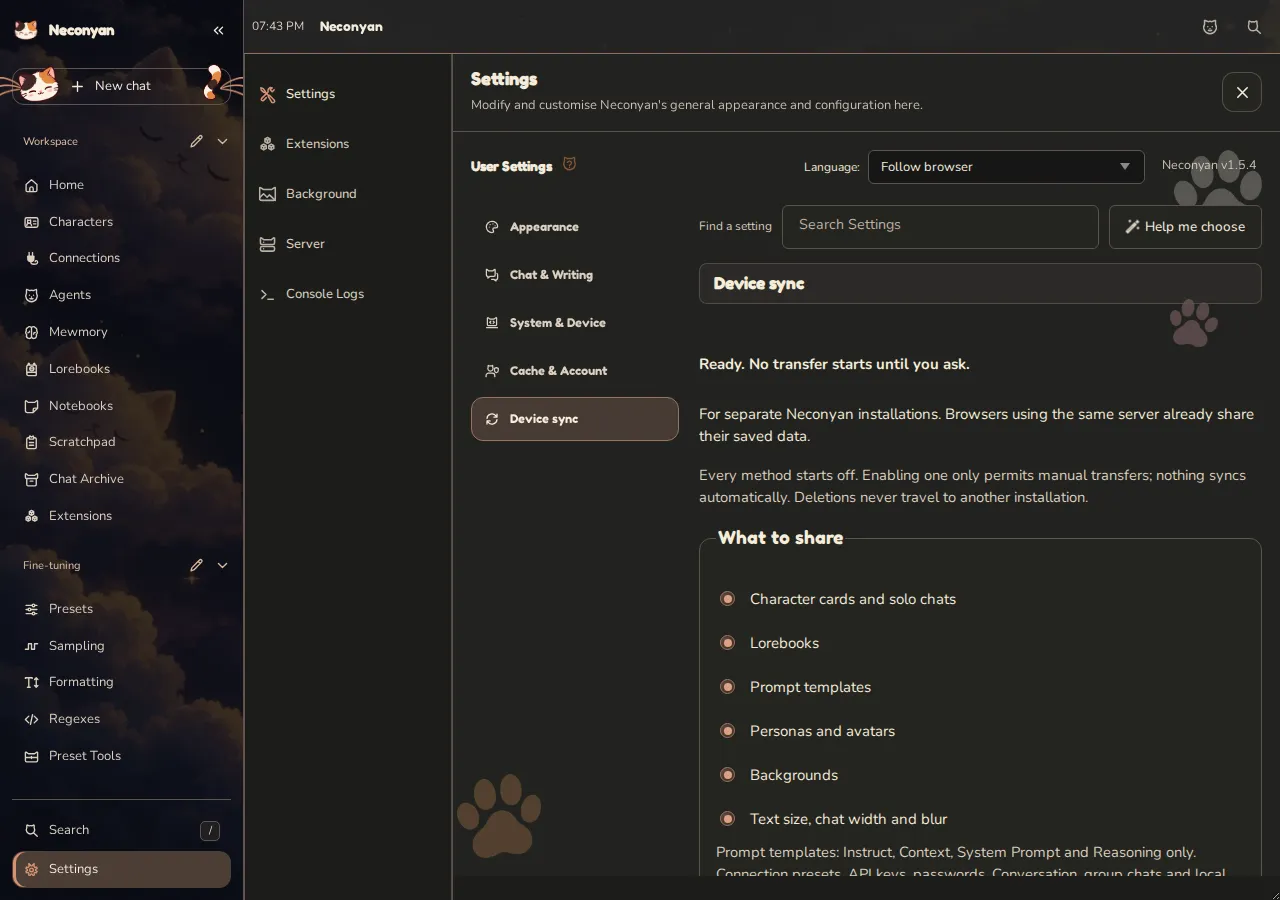
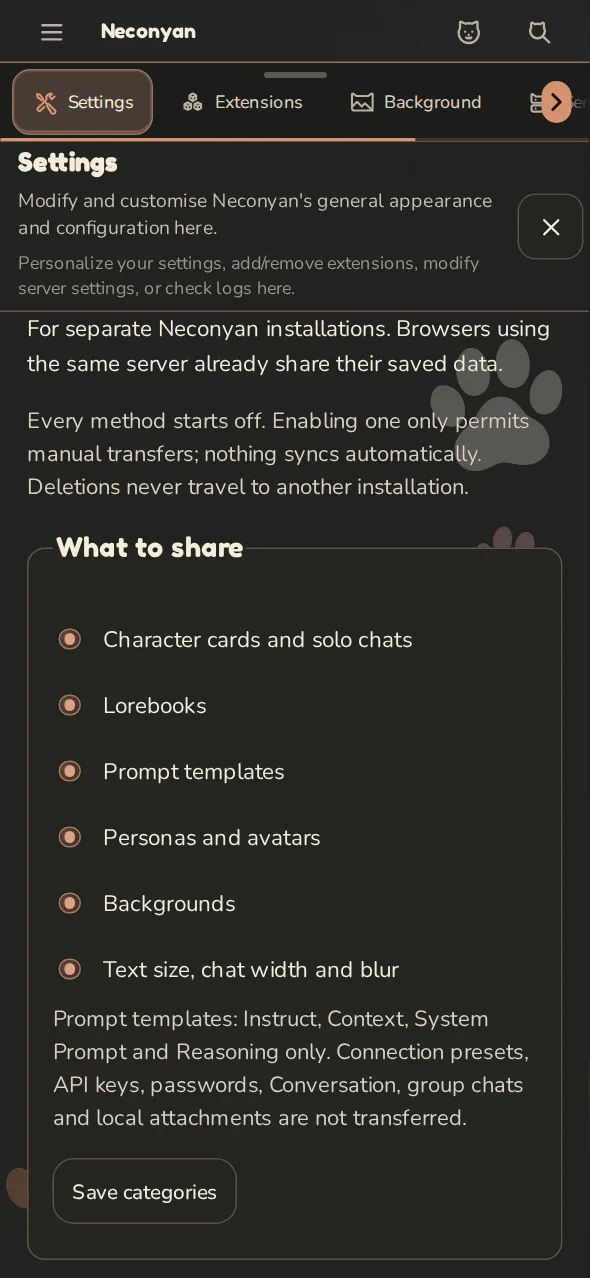
Before the first transfer
- Keep an independent backup of both installations.
- Choose the categories to include, then press Save categories on each installation. These choices apply to incoming and outgoing data.
- Save the same passphrase of at least 12 characters on both sides.
- Enable the method you want to use. All four methods start off, independently.
- Save your current chat and wait for settings to finish saving before importing, syncing, recovering or choosing a conflict resolution.
Enabling a method permits its manual actions. It does not schedule background transfers. Opening the page or saving its configuration does not contact a provider.
After a transfer, use Reload imported data before editing again. Do this when the result is uncertain too, so the open page cannot save an older copy over imported data.
Choose what travels
| Category | What transfers |
|---|---|
| Characters and solo chats | Character cards and individual Roleplay chats, including metadata and reply versions |
| Lorebooks | Selected world-information libraries |
| Prompt templates | Instruct, Context, System Prompt and Reasoning templates |
| Personas | Names, descriptions and matching avatar images |
| Backgrounds | PNG, JPEG, WebP and GIF images |
| Display preferences | Text size, chat width and blur preferences |
Chats need their character cards. If a chat refers to a persona, including a locked persona, select the matching persona and avatar too. Dependencies are not silently added to your selection. Local chat tracking is rebuilt on arrival.
Conversation and group chats, local chat attachments, API keys, sign-ins, provider and generation presets, and arbitrary extension settings do not transfer. Chats that refer to local attachment files are refused. Persona titles, lorebook links, connection choices, appendices and the active persona stay local. Deletions never travel.
Encrypted file
Enable Encrypted file, download a package from one installation, move the file to the other, then import it there. The selected incoming libraries merge with existing data; this does not replace the whole account. Export another package in the other direction to bring later work back.
This method needs no shared online storage or incoming connection to either installation.
WebDAV
Enable WebDAV and save the same complete HTTPS file URL, credentials and passphrase on both installations. Create the parent folder on the storage service first, then press Sync now.
The service must support strong ETags, identifiers for a particular saved version, and conditional PUT, which replaces a file only if that version still matches. Neconyan refuses an unsafe overwrite when these protections are missing. Redirects are not followed.
Secret GitHub Gist
Enable Secret GitHub Gist, save a GitHub token with Gist permission, then press Create secret Gist. Copy the resulting ID to the other installation and use the same passphrase.
A secret Gist is unlisted, not private. The package contents are encrypted. Each transfer adds a uniquely named snapshot; it does not overwrite or delete an earlier one.
Each encrypted snapshot is limited to 900 KiB, with at most 32 retained sync files and fewer than 90 total files in the Gist. For a larger collection, use files, WebDAV or direct pairing. A truncated GitHub response is refused rather than fetched from an unchecked raw-file address.
Direct pairing
- Enable Direct pairing and save the same passphrase on both installations.
- On the receiver, enter its address as reachable from the sender, then press Create pairing code.
- On the sender, paste and save that code, then press Sync now.
Both installations must be running. The sender must be able to reach the receiver; a pairing code does not make a private server reachable. A native phone app may work only as the sender. Use HTTPS. HTTP requires an explicitly permitted local-network or loopback address.
Codes last 30 days, with at most four active codes. Revoke a code when it is no longer needed. Disabling pairing revokes all its codes. Revocation stops later transfer phases, but cannot retract data already published.
You do not put a Neconyan basic-auth password in the pairing code. A separate reverse proxy, the service in front of your server, may need an exception for the exact pairing route. Keep other access restrictions in place; host and IP admission checks still apply.
Review conflicts
Neconyan compares known content history, not dates. When two different copies have no known common history, choose Keep mine or Use incoming copy. Select incoming character cards and personas before chats that depend on them.
Encrypted preserved copies stay available to download after you make a choice. Resolving the conflict does not delete them. Remove them explicitly once you have kept what you need.
A recovery package made from preserved copies can restore content on the same installation, even after deletion. If a different current copy exists, you still review the conflict. Ordinary old or replayed snapshots cannot undo later work.
Recover an interrupted transfer
Keep the original method enabled and press Recover before starting another import. A recovery record is saved before publication. Edits made locally while a transfer was interrupted can become conflicts rather than being overwritten. An active reply, reset or incompatible account operation can stop publication.
Network operations time out after 20 seconds. Retry manually after checking the connection. General limits are 1,000 files, 8 MiB per file, 32 MiB expanded data and a 60 MiB encrypted request. Images are limited to 64 million pixels; local recovery storage has a 160 MiB allowance.
Passphrases and stored packages
Packages use authenticated encryption: a wrong passphrase or altered package is rejected before writes. Keep the passphrase somewhere safe. Changing it does not re-encrypt packages already saved remotely.
Saved credentials are private server files, not hidden from whoever controls that server. Device sync is selected-library transfer, not a substitute for an independent account backup.