The Neconyan handbook
Your guides Miso, Taro & Nori
Choose each guide's gender to change their artwork and pronouns. Your choices stay in this browser, separately from the app.
Agents and Companions
Agents do recurring jobs around a reply: add instructions, rewrite prose or keep a tracker. A Companion writes a separate note without replacing the character's reply.
Start with one helper
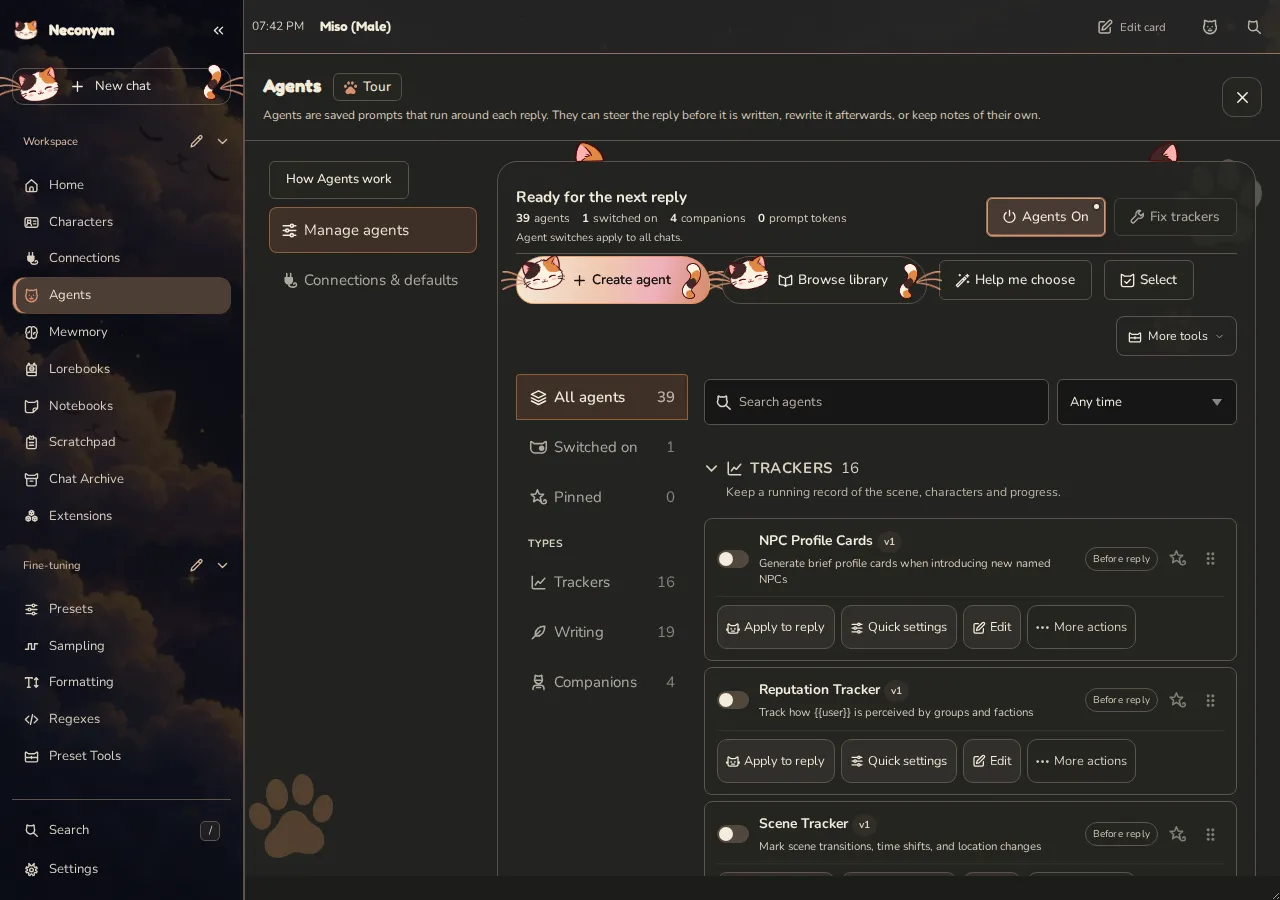
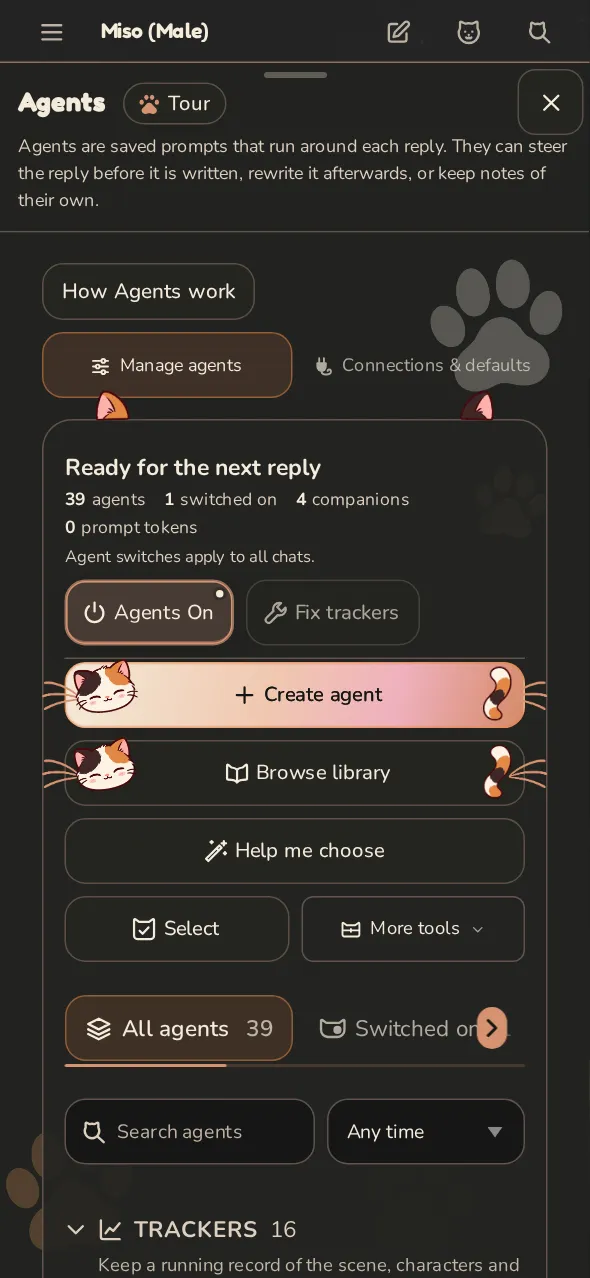
- Open Agents and choose a helper. Help me choose recommends some from a few questions; Browse library has more.
- Open Quick settings. Check its connection, when it runs and how much it can write. Edit opens every control.
- Turn on both Agents On/Off and the helper's own switch.
- Try one short turn and read the result.
Help me choose makes no model request and changes nothing until you approve its picks. Undo switches those picks off; any library additions stay installed.
Use Manage agents to filter by type, timing or enabled state. Connections & defaults holds shared settings. More actions on a card includes Export and Delete.
The page remembers your selected view and folded categories when you return, so reopening Agents doesn't reset the list you were using.
Save changes applies Quick settings. Open full editor saves them before opening the complete editor. When editing several selected Agents, untouched fields stay as they were.
Updating bundled Agents
The version beside a saved Agent describes that copy. Browse library shows the available template version. Agent updates ready → Update all lists the outdated copies and warns about prompts you've edited before replacing them. Connection overrides and your Companion, context, enabled, pin and order choices stay. Dismiss hides the banner until a newer update; individual Update buttons remain.
Bundled reply rewriters
These arrive switched off. Each enabled rewriter can add a model request after the main reply.
| Helper | Use it for… |
|---|---|
| Continuity Corrector | Contradictions in location, clothing, injuries or possessions |
| Proofreader | Prose and formatting corrections |
| Dialogue Humaniser | More natural spoken lines |
| Format Fixer | Broken formatting |
| User Agency Guard | Actions or thoughts invented for you |
| Knowledge Guard | Things the character shouldn't know |
| Character Authenticity Checker | Out-of-character lines, while keeping earned growth |
| Friction Keeper | Unearned agreement |
| Repetition Breaker | Repeated phrasing and gestures |
| Length Trimmer | Replies over your target length |
| NSFW Enhancer | More explicit sex scenes |
| Prompt Adherence Checker | Rules from your enabled preset prompts |
They change the new reply, not earlier messages or the saved card. Recent messages to read supplies earlier context; zero shares only the reply being processed. A model can still get the edit wrong, so read it before continuing.
Continuity Corrector starts with twelve recent messages and can use active lore, notes, trackers and prepared Mewmory facts. When Continuity Companion is also on, they share checks and completed fixes. Knowledge Guard reads saved Secrets Tracker values without rerunning it.
Keep the original when an Agent refuses starts on under Connections & defaults → Context & notifications. A helper's refusal doesn't replace your reply. If the main reply is itself a refusal, after-reply helpers are skipped.
See Proofreader's changes
Find Proofreader in Manage agents, check its Quick settings, then switch it on with Agents On. It runs after a reply. Apply to reply on its card lets you try it on an existing reply first.
Open Agent changes on the edited message to compare the removed and added text. Undo restores the previous text; Redo reapplies the edit. I would read the comparison before continuing the scene.
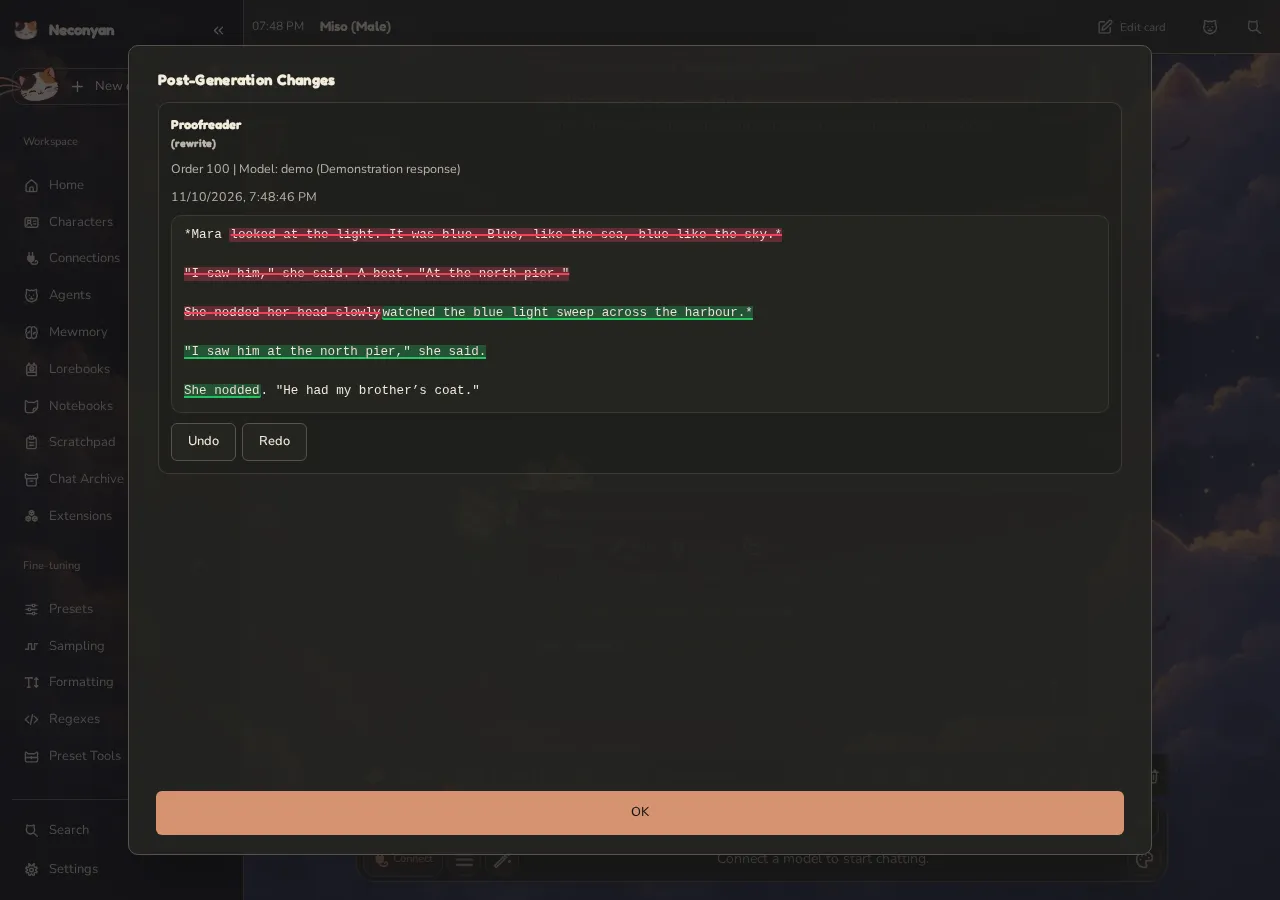
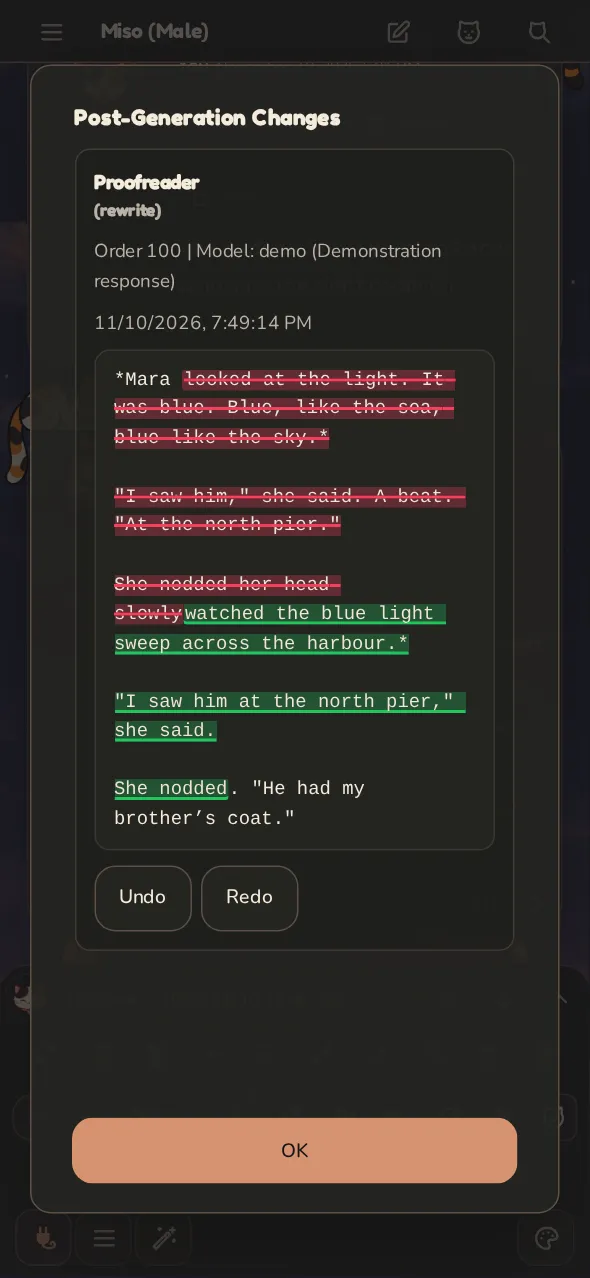
This staged example uses a fixed sample response through the real Agent workflow, including working Undo and Redo. Your connected model writes the edit in normal use; each pass can cost another request. The example shortens repeated gestures and corrects 'Its' and 'should of' without changing what happens in the scene.
Short notes before a reply
These also arrive switched off. Each makes a request before the main reply and adds a short instruction note.
| Helper | Its job |
|---|---|
| Intent Reader | Identify what your message asks for |
| Continuity Pins | Keep up to three immediate facts straight |
| Repeat Spotter | Flag phrases and beats to avoid |
| Beat Planner | Plan the next story beat |
| Pace Setter | Suggest length and where to stop |
Start with one. Several helpers doing the same job can add cost without improving the result. Deleted bundled helpers can be restored from Browse library.
Bundled maps and trackers
- Position Tracker records where people are and what they're doing.
- Visual Map draws places and character positions around you.
- Vitals tracks estimated health, hunger, thirst, energy and morale. Its latest card feeds the next reply by default; turn off Feed recent notes into future generations to keep it display-only.
- Parallel Off-Screen (Extended) writes short scenes about absent characters. Choose it or the shorter version, rather than running both.
- Chatroom gives the scene a reacting audience. Send reply asks that audience to answer without adding your line to the main chat. Poll choices fill its reply box; they don't send themselves.
Companion notes appear in the Companion panel. Each usually needs its own request. Their estimates are model-written observations, not fixed game rules.
Give Plot Compass a direction
Plot Compass is a Companion that proposes possible developments and a next move. It keeps planning notes instead of writing the next story reply, and feeds its latest note into future replies by default.
Its Plot Objectives have separate Global, This character card (or This group) and This chat only fields. Enabled objectives add together; untick one to stop using it without deleting the text. Empty fields add nothing. Press Save and run to save the objectives and request a fresh note, or save the Agent when editing them in its full editor.
An objective is a desired direction, not a guaranteed ending. You can ask for a slow investigation without deciding every choice the characters will make.
Instructions or extra requests?
Added prompt instructions use more input text. Rewriters, before-reply planners and Companions can make extra requests of their own. A visible prompt count doesn't include every later request. Tokens are the units of text models count for limits and billing.
Rerun agents on a reply
Open a reply's message menu and choose Rerun agents. It appears when Agents are on and an enabled after-reply Agent has instructions. Companions have separate rerun controls.
The rerun starts from the reply before its earlier rewrites, preserving your manual edits and tracker repairs. It replaces appended blocks rather than duplicating them. Editing, swiping or leaving that reply while the rerun works prevents its result from overwriting the changed chat. Agent change history offers Undo. Rerunning can cost another request per helper.
Choose connections deliberately
Start with Connections & defaults, then override an individual helper only if it needs another model. If one helper fails while the main chat works, check that helper's connection and fallback profiles.
A smaller model may be enough for a simple tracker. Judge its result rather than assuming every helper needs your main writing model.
Repair a tracker
Press Fix trackers beside Agents On/Off. Agents and the affected tracker must be enabled. Simple repairs need no model; others can make a paid request. Invalid results are rejected rather than replacing the previous text.
Under Connections & defaults → Connection profiles, choose a repair profile and ordered fallbacks if needed. Fix trackers time limit (seconds) starts at 180 per connection; zero removes the limit. Check the reported error if every connection fails.
Order and dependencies
Connections & defaults → Execution rhythm → After-reply agents has two choices:
- Run together starts each helper on the original reply. Different rewrites may need one extra request to combine them.
- Run one at a time passes each result to the next helper in order. It takes longer but avoids that combining request.
Manually started after-reply helpers always queue one at a time. Their queue is separate from Companions. Stop ends active work and clears waiting runs. If the main reply has finished, it is kept without asking the model to write it again.
A failed after-reply helper is retried once. If it still fails, the completed reply and applicable successful changes are kept. You don't need to regenerate the main reply. Roleplay explains the remaining chat-change cases.
Batch Companions and share notes
Select two or more Companions in Manage agents → Batch & connect. Batch in one request groups compatible connections, models and context settings. Incompatible helpers still run separately.
Sharing latest notes is different from waiting: it reads completed notes already available. Use a dependency when one helper needs a fresh result from another. Check each Companion's connections in Quick settings, save, then try a turn before building a long chain.
Agent placeholders can read prepared memory and group-card fields. They don't perform a new memory search.
History and visibility
Open the Companion panel from its floating or top-bar button. Search companions and notes filters the view without running anything. More tools → Companion activity shows what ran.
Completed notes appear as each helper finishes. Live reply marks a preview; editing, rerunning and sending it to a lorebook wait until it is saved. The model label describes the completed request, not your current selection.
In a popped-out Companion window, tap its header to fold or unfold the note. Dragging the header moves the window instead.
Keep in history controls future context. Where kept notes go chooses the newest reply, each note's own reply or one labelled block. Hiding a note on screen doesn't necessarily remove it from future prompts.
Insert the block at depth places that one labelled block a set number of messages from the newest reply. Setting a depth switches kept notes to One labelled block; leaving it blank uses the agent's Position and Depth fields.
Troubleshoot a helper
Check its global and individual switches, trigger, actual connection, context, output limit and activity. If a tracker repair fails, read the error before trying again. Repairs and retries can add usage.
The Agent control reference covers every editor field. For recalling past story events rather than keeping a tracker, see Mewmory.